How to Set Up Amazon Sponsored Products Without Wasting Budget
Contents expand_more
Your complete beginner’s setup guide for Amazon Sponsored Products campaigns
Introduction
Your product isn’t selling. You refresh Seller Central waiting for orders, but the dashboard stays silent.
Manual targeting feels like control. It’s expensive guesswork. High bids feel like speed. They burn budget before you learn. Organic visibility on Amazon is nearly impossible for new products, and every day without sales hands customers to competitors.
Your first Sponsored Products campaign needs three settings that protect your budget while Amazon identifies which searches work. This guide shows you exactly how to set up, which to use, and what to expect in the first three weeks.
What You Need Before Creating Your First Campaign
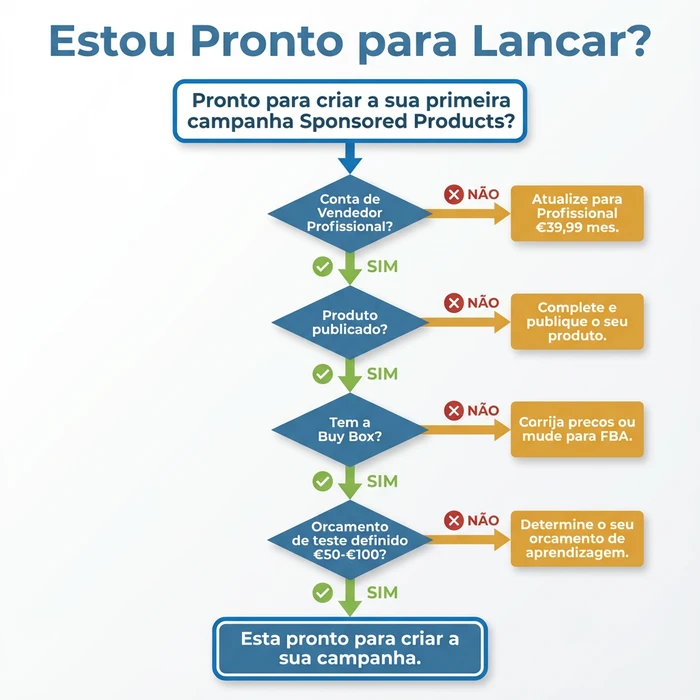
Professional Seller account. Mandatory.
Individual accounts cannot run Sponsored Products. The Professional account costs €39.99 per month and unlocks the full advertising platform. For any seller planning to advertise, it pays for itself in the first sales.
The product must be active and complete. Drafts don’t work. Suppressed products don’t work. Products without images or bullet points don’t work. Amazon amplifies what exists, it doesn’t fix the incomplete.
Use this decision tree to check whether you’re ready to launch your first campaign
The Buy Box decides everything. Ads direct traffic to the Buy Box, not to you. If a competitor owns it, you pay for the clicks but they get the sales. Check in Seller Central before spending a single euro.
Stock available. Sounds obvious but it kills campaigns. Amazon pauses when you hit zero, but you’ve already paid for the clicks that came before. Keep 30 days of stock before launching.
A test budget of €50-€100 you can lose. The first campaign is market research, not profit. This amount covers 5-10 days at €10 daily, enough for real data on whether PPC works for your product.
Why Professional Status Matters
Priority access to advertising. Bulk listing tools. Advanced reports. All included in the €39.99 monthly fee versus €0.99 per sale for individual accounts.
The Buy Box Requirement Explained
Amazon shows your ad. The competitor owns the Buy Box. The customer buys from them. You paid for the click, they got the sale. Check ownership before activating campaigns.
Stock Considerations
Running out of stock during a campaign wastes prior investment. The algorithm rewards consistent availability with better placement. Plan for 30 days minimum.
How Sponsored Products Work
You pay when they click. Really.
Sponsored Products appear in search results and on competitors’ pages. A small label says “Sponsored”. Otherwise they look like normal results. Buyers click when it’s relevant.
A thousand impressions cost zero if nobody clicks. The daily budget controls how much you spend. Amazon pauses when you hit the limit. Simple.
Amazon matches your product to searches using automatic or manual. Automatic lets the algorithm analyse your product and show it for relevant searches. Manual requires you to choose each keyword. For beginners, automatic always.
Product quality affects everything. Weak images mean clicks that bounce. Weak bullet points mean no sales. Bad prices mean wasted money. Optimise the product before spending on ads.
Where Ads Appear
Top of search gets the best traffic. Buyers see it first. The rest of search results interleave with organic results. Product pages show on competitors, capturing those already shopping.
The Auction Simplified
The buyer searches. Amazon runs an instant auction. Your bid is the maximum, not the guaranteed price. Amazon charges only enough to beat the next bid, frequently €0.02-€0.10 less than your maximum.
Why Quality Matters First
Ads send traffic. The product converts traffic. A 2% conversion rate at €1.00 CPC costs €50 per sale. A 4% rate costs €25. Double the quality, halve the cost.
Step by Step: Creating Your First Campaign
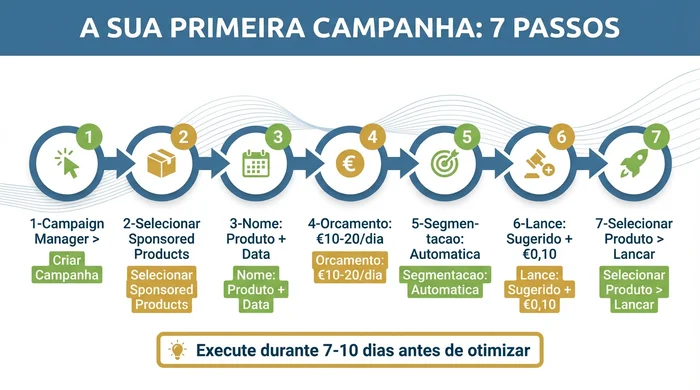
Seller Central. Advertising. Campaign Manager.
Click “Create campaign”. Select “Sponsored Products”. Skip Sponsored Brands and Display, too complex to start with. Sponsored Products delivers results faster.
Name the campaign with a clear format. “Yoga Mat - Auto - Jan2026” works. “Campaign 1” doesn’t. Your future self thanks your present self.
Skip portfolios. They add complexity without benefit for beginners. Leave blank.
Start date today. End date blank. Continuous campaigns build momentum. End dates stop unexpectedly if you forget to extend.
Daily budget in the field. This is the maximum per day, not guaranteed spend. Actual spend runs 60-80% of the set amount, especially in the first week while Amazon learns.
Navigating to Campaign Manager
Advertising is in the main tab. If you don’t see it, check your Professional status in Settings. Individual accounts don’t show advertising.
The Settings Screen
Name, portfolio, dates, budget, targeting, bid. In that order. Amazon recommends values based on category averages. Ignore them mostly. Beginners need conservative.
The Portfolio Question
Skip. Clicking “Create portfolio” opens additional screens that distract. To start, blank works.
Setting the Schedule
No end date runs continuously. It builds data and momentum. Scheduled campaigns make sense for seasonal, not for learning.
The Settings to Use
Automatic targeting. Always for the first one.
Automatic includes four types: close match for related searches, broad for wider ones, substitutes on competitors’ pages, and complements on products bought together. Amazon controls everything.
Daily budget €10 minimum. Below that generates insufficient data. €5 at €0.75 CPC produces 6-7 clicks daily. Six clicks almost never produce a conversion. No conversions, no ACoS, no learning.
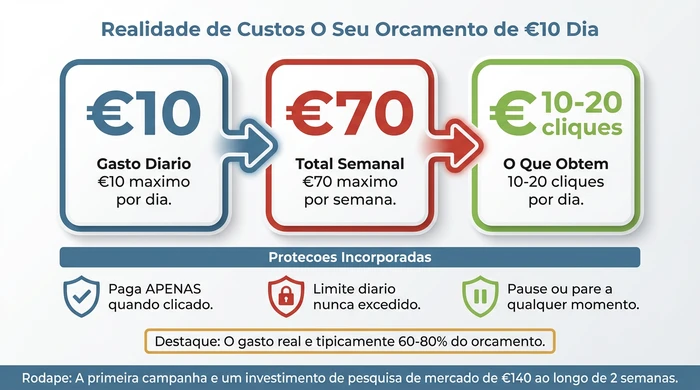
Understand the true cost and value of your €10 daily budget
Default bid €0.75. Covers most categories without overpaying. Amazon suggests higher? Start at €0.75 or 60-75% of the suggestion. You can always increase after seeing data that proves it works.
“Dynamic bids - down only” strategy. Conservative. Amazon lowers bids when conversion is unlikely, protecting budget. “Up and down” raises bids for premium placements. It needs data beginners don’t have.
| Setting | Recommended Value | Why This Matters | Beginner Tip |
|---|---|---|---|
| Campaign Name | [Product Name] - Auto - [Date] | Easy identification when managing multiple campaigns later | Use consistent naming from day one |
| Daily Budget | €10 | Generates enough clicks for meaningful data | €10/day = €300/month maximum. Actual is 60-80% |
| Targeting Type | Automatic | Amazon finds keywords for you | Automatic is keyword research, not weakness |
| Default Bid | €0.75 | Conservative - you can raise it later | Suggestion of €1.20? Start at €0.75-€0.90 |
| Duration | No end date | Continuous campaigns build momentum | Pause manually if needed |
| Bidding Strategy | Down only | Protects the budget | Avoid "up and down" until 30+ days |
Why Automatic First
Manual requires keyword research. Volume estimation. Conversion guesswork. All before spending a single euro. Automatic tests dozens simultaneously. It identifies winners through real data. After 2-3 weeks, harvest the best ones for manual.
Budget Logic
€10 daily at €0.75 CPC generates 13 clicks. A 10% conversion rate produces 1-2 sales daily. New products convert lower initially, but 13 clicks daily means 90+ weekly. Enough to identify which segments work.
The €0.75 Point
Categories vary. Electronics may need €1.00+. Kitchen frequently works at €0.50-€0.60. €0.75 positions you in the middle of most auctions without overpaying.
Strategy Explained
“Down only” reduces €0.75 to €0.50 when conversion is unlikely. You never pay more than €0.75, frequently less. “Up and down” raises to €0.90-€1.00 on high conversion. That makes sense after you know which ones convert. It wastes money during learning.
What to Expect After Launch
The first 48 hours show low impressions. Normal.
The algorithm tests various placements. The ad enters the auction immediately, but Amazon rotates through different positions to measure performance. Expect 100-500 impressions on day one, 500-1,000+ by day three.
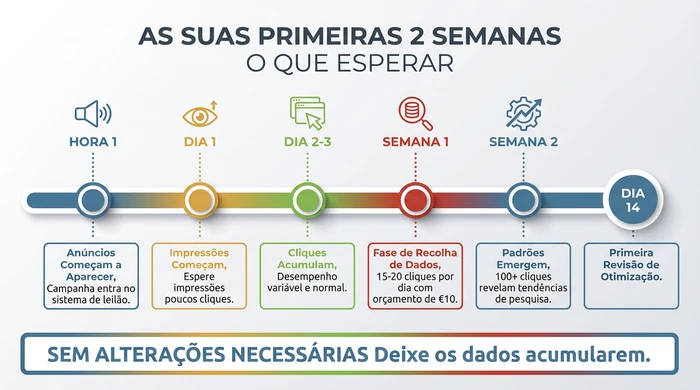
Your realistic timeline for the first two critical weeks
Week one is pure data collection. ACoS fluctuates wildly. One sale shows 40%, two sales show 40%, three sales show 46%. Normal variations. No meaning until 100+ clicks.
Weeks two and three reveal real patterns. After 150-200 clicks, ACoS stabilises. Reports show which queries generate clicks. You can identify negatives wasting budget. Optimisation decisions become possible.
Typical new-seller ACoS: 30-60% initially. Established products run 15-25%. New products lack reviews and history. Lower conversion rates. Higher cost per acquisition. Expected and temporary.
Wait two weeks before changing. Adjusting after 3-4 days means deciding based on noise, not patterns. The only reason to intervene early: budget exhausts within hours, indicating bids are too high.
First 72 Hours
Amazon tests positions to measure clicks and conversions across different placements. Top of search for some, product pages for others, rest of search for third ones. Testing requires 48-72 hours.
Week One Volatility
Zero sales Monday, two Tuesday, one Wednesday, zero Thursday. Apparent swings. Normal timing variation. Some buy immediately, others three days later. Amazon attributes to the click, but the delay creates volatility in reports.
The Two-Week Threshold
Statistical significance requires minimum samples. 100 clicks allows simple decisions. 200+ allows confident adjustments. Never optimise with fewer than 100 total.
Understanding Initial ACoS
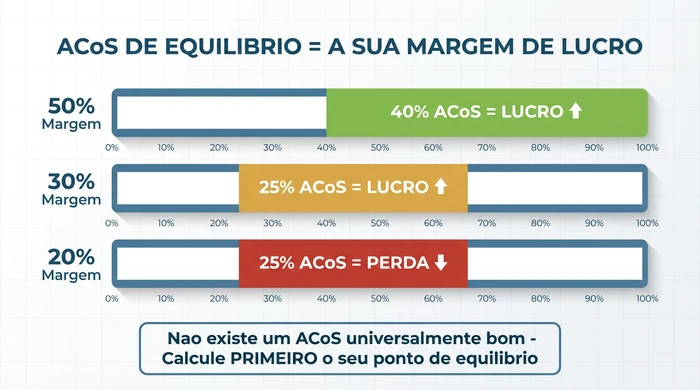
ACoS measures cost as a percentage of sales. €40 spent, €100 in sales = 40% ACoS. Profitability depends on margin. 30-60% is normal for new products without reviews. As ranking improves and reviews accumulate, ACoS decreases naturally.
Mistakes That Burn Money
Manual creates paralysis. Research keywords. Select 20-30 terms. Set bids. Wait. Most generate zero conversions because you chose based on volume, not conversion. The budget evaporates testing guesses.
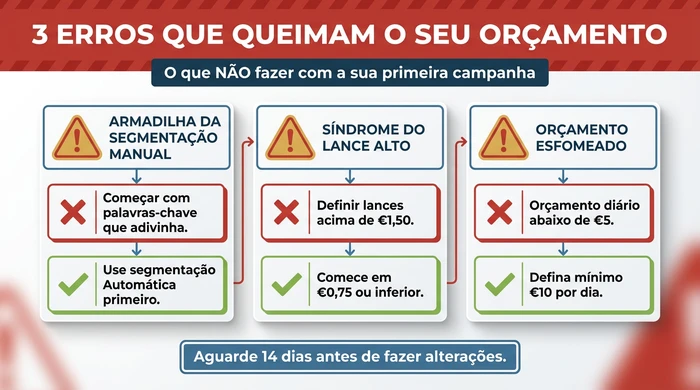
Avoid these three budget-burning mistakes
Bids above €1.50 trigger the syndrome. You pay a premium without conversion data. One day exhausts the week. A €3.00 bid x 50 clicks = €150. A €25 product, 2 sales = 300% ACoS.
Budgets below €5 create data starvation. €5 at €0.75 = 6-7 clicks daily. A 10% rate = 0.6 sales daily. No conversions, no real ACoS. No identifying which terms work. 30 days later: €150 spent, zero statistical confidence.
Pausing after 3-4 days is premature optimisation. Three days at €10 = 40 clicks. Even a 20% conversion rate (rare) may still not produce enough sales for meaningful ACoS. You’re deciding based on noise, not patterns.
The Manual Trap
Beginners see manual as advanced. Automatic as basic. The perception is backwards. Manual requires skills that only come from running automatic first. Understanding keywords vs search terms clarifies why automatic finds opportunities manual misses.
Bid Syndrome
Competition anxiety drives high bids. You see competitors, assume you need to go higher. The auction rewards relevance and conversion alongside bid. A relevant ad at €0.75 frequently beats a poorly matched one at €2.00. Start low, increase with data.
Low Budget
Fear of waste drives low budgets. Insufficient data guarantees waste. €150 over 30 days, 200 clicks across 50+ terms, nothing actionable, start again. Concentrating €150 into 14 days at €10 generates insights in half the time.
Premature
The temptation to do something after days is strong. You see a term with 5 clicks and zero sales, add a negative, keep adjusting. Every change resets learning. You never let it run long enough for significance. Commit to 14 days with zero changes except pausing if it burns through too fast.
What Comes Next
Wait for 100 clicks or 14 days minimum. The Search Terms Report becomes meaningful at this threshold. Enough data for clear patterns, not noise.
Download the Campaign Manager report. You see which searches triggered ads and generated clicks. It shows impressions, clicks, sales, spend per term. Sort by spend. Identify the highest-cost terms. Check whether they generated sales. High spend with zero sales becomes a negative candidate.
Add negatives to block wasteful terms. They prevent ads from appearing for specific searches. They reduce spend on irrelevant traffic. Add one at a time based on clear data: zero conversions after 10+ clicks.
Review the automatic segments. Identify which of the four types performs best. Amazon reports close match, broad, substitutes, and complements separately. Increase bids on segments with sales and acceptable ACoS. Decrease on high spend with low sales.
Consider manual only after validating that automatic generates profitable sales. Manual works best by harvesting proven terms from the automatic report and targeting them with exact or phrase match. A data-driven approach avoids the guesswork that destroys budgets.
The 100-Click Rule
Below 100, sampling errors dominate. One extra sale swings ACoS by 20-30 points. Above 100, individual sales have less impact. Performance stabilises near true values. Simple rule: never optimise with fewer than 100 except if it burns so fast that waiting exceeds the total.
First Report
Campaign Manager > Select Campaign > Search Terms Report. Download the CSV for easy analysis. Sort the “Spend” column descending. Identify the most expensive terms. Cross-reference spend against “Orders” for high spend with zero conversions.
When to Add Negatives
When a term accumulates 10+ clicks with zero sales and the term is clearly irrelevant. Example: a yoga mat receiving clicks for “yoga mat cleaner” means the searcher wants cleaning products, not mats. Add “cleaner” as a negative. Avoid adding too early because some relevant terms take 15-20 clicks before the first conversion.
The Manual Transition
Launch manual after automatic proves profitability and you have 3-4 weeks of data. Identify the 10-15 highest-converting terms from the automatic report. Create a manual campaign with exact match targeting the proven terms. Use bid amounts based on the CPC observed in the automatic data.
Variations and Exceptions
High-competition categories may need €15-€20 daily. Supplements, electronics, pet products show average CPCs of €1.00-€1.50. The same €10 that generates 13 clicks in home produces 6-7 in supplements. Check the average CPC after the first few days. Adjust the budget to maintain 10-15 clicks daily.
Products below €10 need different strategies. €5 doesn’t sustain €0.75 CPC unless conversion exceeds 15% (rare). Start bids at €0.50 or lower. Target a maximum of €0.40-€0.50 CPC for profitable ACoS.
Brand Registry unlocks additional options. Product Attribute Targeting. Audience segments. Sponsored Brands. New sellers should still start with basic automatic Sponsored Products before exploring advanced options.
Seasonal products require different timing. Winter in October means complete learning before the December peak. Summer needs a March-April launch. Consider the 2-3 week curve when timing seasonal launches.
High-Competition Adjustments
Electronics, beauty, and pet products show CPCs above €1.50. If the first week consistently reveals above €1.00, recalculate. Budget = (desired clicks) x (observed CPC). For €1.50 CPC, €15 daily maintains 10 clicks.
Low-Price Products
Below €15 requires aggressive conversions. Calculate break-even ACoS before launching. A €8 product with a €3 margin (37.5%) = maximum ACoS 37.5%. At €0.75 CPC it needs a minimum 5% conversion rate to be profitable.
International
The UK shows typical £5-£8. Germany requires higher due to strong local competition. Japan has different dynamics due to its mobile-first market. Research marketplace-specific guides before launching.
Frequently Asked Questions
What is the minimum daily budget?
The technical minimum is €1, the real one is €10. Below €10 it runs out before enough clicks for patterns. Inconclusive results after weeks.
Difference between automatic and manual?
Automatic lets the algorithm match your product to searches. Manual requires choosing specific keywords. Start with automatic to discover what converts.
How much does it cost?
You pay per click, not per impression. Average CPC €0.30-€2.00 depending on category. €10 daily generates 5-30 clicks. Actual spend 60-80% of the set amount.
Can an Individual account run ads?
No. It requires Professional at €39.99/month. Individual at €0.99/sale has no advertising access.
A good starting bid?
€0.75 for most categories. It covers typical auctions without overpaying. Adjust after 100+ clicks. Suggestion of €1.20? Start at €0.75-€0.90, test before committing.
Conclusion
Three critical settings: automatic so Amazon finds conversions, €10 daily for meaningful data, €0.75 to avoid overpaying. They work together for actionable insights in 2-3 weeks while controlling risk.
The two-week curve is inevitable. The algorithm needs to test. The product needs exposure. You need data to decide. Shortening it through high bids or manual wastes budget testing guesses.
After proving profitability with automatic, explore advanced strategies including manual, bid optimisation, and refinements. Create your first one today using these settings. Then commit to waiting 14 days before changing anything. The data you collect determines whether PPC becomes a profitable channel or an expensive experiment.