
How to Write Amazon Bullet Points That Sell [2026 Guide]
![How to Write Amazon Bullet Points That Sell [2026 Guide]](/images/guides/zonas-risco-contagem-caracteres-medidor.webp)
Contents expand_more
Your conversion rate is stuck at 8% while competitors hit 20%. You’ve tried everything. Better images. Lower prices. More reviews. Nothing moves the needle.
The problem isn’t your product. It’s your bullet points.
Amazon buyers scan your bullets in under 30 seconds. They’re not reading. They’re looking for a reason to click “Add to Cart” or skip to the next listing. Most sellers waste this window with generic feature lists or keyword stuffing that Amazon’s automated editing system now flags and rewrites.
Here’s what changed in August 2024: Amazon can now auto-edit bullet points that violate policy. Your carefully crafted copy? Gone. Replaced with generic text you never approved.
This guide gives you the exact system for writing high-converting Amazon bullet points that pass Amazon’s filters and actually sell your product. No fluff. No theory. Just the practical framework that works.
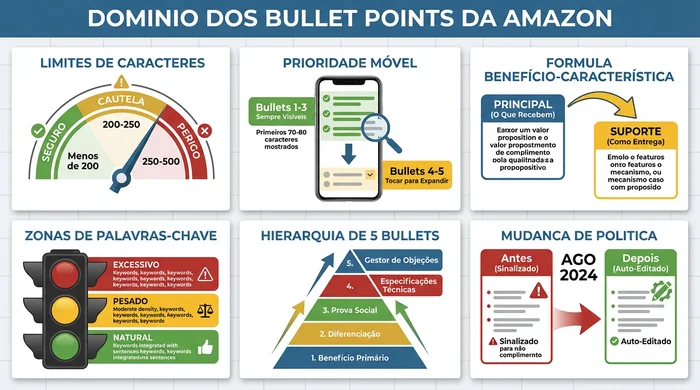
The complete Amazon bullet point optimisation framework at a glance
What Makes Amazon Bullet Points Convert
High-converting bullet points do three things: they answer the buyer’s main question in 3 seconds, prove your product solves a specific problem, and survive mobile display where 63% of Amazon shoppers browse.
The formula is simple. Lead with what the customer gets. Support with how your product delivers.
The Benefit-First Formula:
- Lead with the benefit - “Keeps coffee hot for 12 hours” beats “Double-wall vacuum insulation”
- Quantify the outcome - “Saves 15 minutes per load” beats “Faster drying”
- Address hidden objections - “Fits standard cup holders (8.1 cm diameter)” eliminates the “will it fit?” hesitation
- Prioritise for mobile - The first 70-80 characters must hook the reader
- Match search intent - If they searched “leak-proof water bottle”, that phrase appears in bullet 1
Amazon’s character limit is 200 characters per bullet for most categories. But mobile display cuts that off at around 150 characters before the “more” button appears.
Your perfect bullets on desktop can look terrible on mobile. Test by viewing your listing on your phone before publishing.
Character count risk zones: Stay below 200 for best results
The Psychology Behind High-Converting Bullets
Amazon buyers don’t make logical decisions and then buy. They make emotional decisions and then seek logical justification. Your bullet points must satisfy both layers.
Example: Insulated Coffee Mug
- Emotional Layer: “Never lose hot coffee during your morning routine” (convenience, self-care)
- Logical Justification: “12-hour insulation keeps coffee hot from the 6am breakfast to the 6pm return home”
- Combined Bullet: “Never lose hot coffee during your morning routine - 12-hour vacuum insulation keeps drinks hot from 6am to 6pm, no reheating”
The first 10 words trigger the emotion. The supporting details provide the logic customers use to justify the click.
The 5-Step Bullet Point Writing System
Writing bullet points that convert requires a systematic approach. Follow these five steps every time you create or review your listing.
Step 1: Identify the Top 5 Customer Questions
Before writing anything, answer this: What are the 5 questions preventing someone from clicking “Add to Cart” right now?
Pull these from your product reviews. Look for “Wish I’d known…” comments. Check competitor reviews for complaints appearing more than 10 times. Browse Amazon’s “Customers also asked” section.
Example for a yoga mat:
- Will it slip during hot yoga?
- Does it smell of rubber?
- Is it thick enough for sensitive knees?
- Can I put it in the washing machine?
- Does it fit in a standard gym bag?
Each bullet answers ONE question. Not features. Questions.
Step 2: Write Benefit-First Statements
Take each question and turn it into a benefit statement with proof.
Bad: “Made with TPE material”
Good: “Non-toxic TPE material passes Prop 65 tests - safe for daily use, no chemical smell when unboxing”
The pattern is [Benefit] + [Proof/Specification] + [Why it matters]. Every bullet follows this structure.
For sellers who struggle to identify which benefits resonate emotionally, WhyBuyIt takes a psychology-first approach - analysing your product category to reveal the emotional motivators customers actually care about.
Step 3: Put the Key Information in the First 10 Words
Mobile users see roughly the first 10-12 words before “…” appears. Your first bullet must win the tap to expand.
Opening that dies on mobile: “Our premium yoga mat features state-of-the-art construction with…”
Mobile-optimised opening: “Anti-slip surface grips during hot yoga - textured pattern prevents slips even when wet”
The benefit lives in the first 10 words. The proof follows.
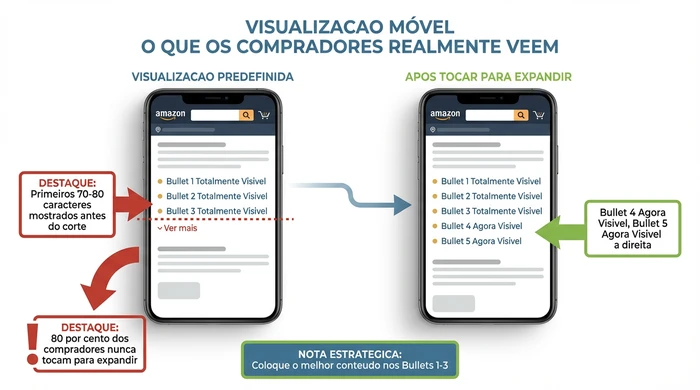
80% of shoppers never tap to expand - put your best content in bullets 1-3
Step 4: Use the Bullet Prioritisation Hierarchy
Not every benefit deserves bullet space. Position determines purpose.
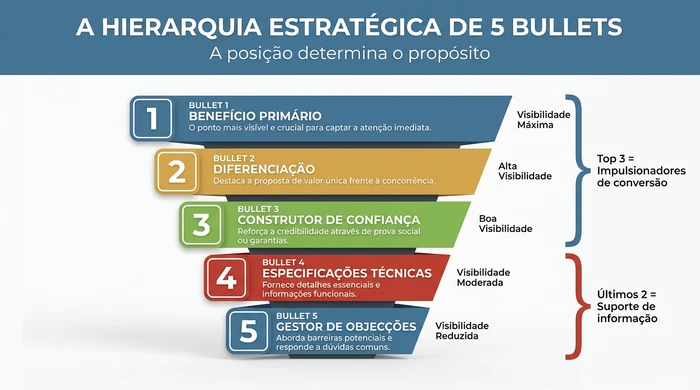
The strategic 5-bullet hierarchy: The first 3 drive conversions, the last 2 support
- Bullet 1: Primary benefit + main keyword (always visible on mobile)
- Bullet 2: Secondary benefit + differentiation (always visible on mobile)
- Bullet 3: Trust builder - social proof, guarantee or credibility (last always-visible bullet)
- Bullet 4: Technical specifications - dimensions, materials, compatibility (requires tap)
- Bullet 5: Objection handler - addresses concerns, FAQs, compatibility (lowest visibility)
Bullets 1-3 are your conversion drivers. Bullets 4-5 provide informational support for detail-oriented buyers who have already decided you’re a contender.
Step 5: Test and Iterate
Conversion optimisation never stops. Change one bullet every 30 days and track your conversion rate.
Amazon doesn’t allow direct A/B testing of bullets. But you can monitor the sessions-to-orders ratio before and after edits. Run Sponsored Product campaigns with different messaging to test angles. Survey buyers 7 days after purchase: “What convinced you to buy?”
Amazon’s August 2024 Bullet Point Policy Changes
Amazon launched automated editing in August 2024. If your bullets violate the content policy, Amazon rewrites them without warning.
What triggers auto-editing:
- Promotional language (“Best seller”, “Top rated”, “Act now”)
- Price references (“Only 19.99 EUR”, “Cheaper than competitors”)
- Shipping claims (“Free 2-day shipping” belongs in the offer, not the bullets)
- Claims unrelated to the product (“Incredible customer service”, “30-day guarantee”)
- Emojis and special characters
What still works:
- Quantified product claims backed by specifications
- Comparative statements about YOUR product (“30% greater capacity than our previous model”)
- Compatibility information
- Certifications and test results
Run your bullets through Amazon’s listing quality dashboard before publishing. Warning flags appear in real time. Fix them before Amazon’s bot does it for you.
Prompt Template for Creating Bullet Points
Use this AI prompt to generate your first draft. Copy and paste into ChatGPT or Claude.
AMAZON BULLET POINT GENERATOR:

Product: [Your product name]
Category: [Amazon category]
Primary Benefit 1: [What problem does it solve?]
Primary Benefit 2: [What outcome does the buyer get?]
Primary Benefit 3: [What makes it better than alternatives?]
Target Customer: [Who buys this?]
Key Feature 1: [Technical specification that matters]
Key Feature 2: [Technical specification that matters]
Primary Keyword: [Main search term]
Secondary Keywords: [3-5 additional terms]

Generate 5 Amazon bullet points that:
- Lead with benefits, support with features
- Stay under 200 characters each
- Include keywords naturally (without stuffing)
- Use normal title case, no ALL CAPS
- Put the most convincing information first
This prompt gets you 80% of the way there. The final 20% is manual polish - replacing generic language with product-specific proof points.
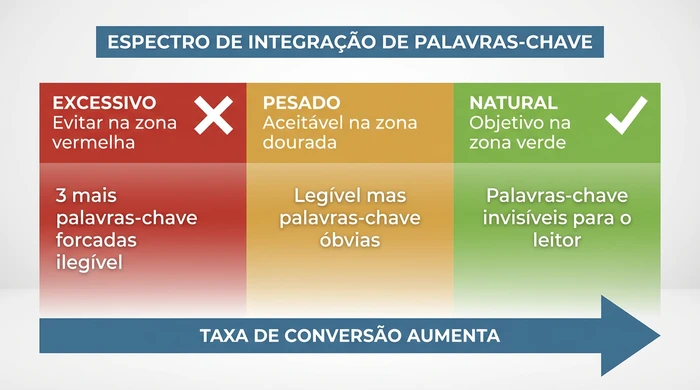
Natural keyword integration converts better than obvious stuffing
Bullet Point Before/After Transformations
Example 1: Wireless Earbuds
BEFORE (Feature List Style):
- Bluetooth 5.0 technology with advanced chipset
- Premium sound quality with deep bass
- Comfortable fit for all-day wear
- Comes with charging case included
AFTER (Conversion-Focused):
- 48 hours of battery with charging case - Charge once a week, not daily
- Secure fit stays put during runs - 3 sizes of silicone tips included
- Crystal-clear calls with dual microphones - Noise cancellation filters out wind
- Instant pairing with iPhone and Android - Connects in 2 seconds on case opening
Benefits moved to the front. Proof points added. “Why it matters” context closes each bullet.
Example 2: Kitchen Knife Set
BEFORE:
- High-carbon stainless steel blades
- Ergonomic handle design
- Full tang construction
AFTER:
- Stays sharp 3x longer than standard knives - High-carbon German steel holds its edge for over 200 meals
- Balanced weight prevents hand fatigue - Full tang design distributes weight evenly
- Includes the 8 knives you’ll actually use - Chef’s, paring, serrated, utility, carving knives
The transformation pattern: quantify the benefit, explain the feature, connect to real use.
Bullet Point Prioritisation Matrix
Use this matrix to decide what information to place in each bullet position.
| Scenario | Action | Rationale |
|---|---|---|
| BULLET POSITIONS 1-2: Highest Priority (First 3 Seconds) | ||
| High Emotional Impact + Unique to Your Product | Place in Bullet 1 or 2 Lead with your strongest differentiator that solves a painful problem | Buyers on mobile devices see only bullets 1-2 without scrolling. Your unique value proposition must appear here or it may never be seen. |
| Feature solves competitors' no.1 complaint | Bullet 1 Candidate Frame as a "finally" or "never again" statement | Customers comparing products are primed to notice solutions to problems they've just read about in negative reviews. |
| BULLET POSITION 3: Category Validation | ||
| High Emotional Impact + Standard Category Feature | Place in Bullet 3 Confirm you meet expectations, but emphasise HOW you do it better | Buyers need reassurance that you cover the basics. Position 3 says "yes, we do that too" while 1-2 say "here's why we're different." |
| Mandatory feature that every competitor claims to have | Bullet 3, with proof Add specificity: numbers, materials, certifications | Generic claims go unnoticed. "BPA-free" is forgettable. "FDA-certified food-grade Tritan plastic" creates credibility separation. |
| BULLET POSITIONS 4-5: Supporting Information | ||
| Low Emotional Impact + Unique to Your Product | Place in Bullet 4 Include for completeness, but don't lead with it | Unique specifications matter to buyers doing deep research. They've already decided you're a contender if they've reached bullet 4. |
| Technical specifications (dimensions, quantities, compatibility) | Bullet 4 or 5 Present clearly without emotional framing | Detail-oriented buyers need this information to confirm suitability. Emotional buyers skip it. Place it where it informs without blocking persuasion. |
| Guarantee or brand promise | Bullet 5 Close with risk reversal | Trust elements work best after value is established. Ending with a guarantee creates the confidence for the "Add to Cart" click. |
| CUT ENTIRELY: Do Not Include | ||
| Low Emotional Impact + Category Standard | Omit or minimise Move to product description or A+ Content if necessary | Standard features without an emotional hook waste premium bullet space. They neither differentiate nor persuade. |
| Information already visible in the title, images or product details | Do not repeat Use the bullet space for NEW information | Redundancy signals lazy copywriting. Every bullet should reveal something the buyer can't learn elsewhere in the listing. |
| Vague superlatives ("best quality", "premium materials") | Replace or remove Replace with specific, verifiable claims | Amazon buyers are conditioned to ignore generic marketing language. Every word must earn its place through specificity. |
Character Limits by Category
Amazon’s bullet point rules vary by category. Violate them and your listing is suppressed or auto-edited.
| Category | Character Limit | Special Rules |
|---|---|---|
| Home and Kitchen | 250 characters | Measurement claims must be verifiable |
| Clothing and Accessories | 256 characters | Size charts mandatory for fit claims |
| Electronics | 200 characters | Compatibility lists permitted |
| Beauty and Personal Care | 200 characters | Health claims trigger regulatory review |
| Toys and Games | 200 characters | Age recommendations mandatory |
| Sports and Outdoors | 200 characters | Safety certifications must be cited |
When in doubt, stay under 200 characters. It works across all categories and guarantees mobile compatibility.
Learn more about how to optimise your entire Amazon listing for maximum visibility and conversions.
Variations and Special Cases
Brand Registry Differences: Unregistered sellers face stricter automated reviews. Brand Registry sellers can include light brand language, but promotional claims are still flagged.
Mobile vs Desktop: Desktop shows full bullets. Mobile truncates after 150 characters with a “more” button. Since 63% of buyers browse on mobile first, optimise for the smaller screen.
International variations: Character limits may differ by marketplace. When selling on Amazon UK, DE or other international sites, check the local style guide requirements.
For more in-depth guidance on Amazon keyword research, see our dedicated guide on finding the right terms for your listings.
Frequently Asked Questions
Q: What is the character limit for Amazon bullet points?
200 characters for most categories. Home and Kitchen allows 250. Clothing allows 256. Mobile display cuts off at around 150 characters before the “more” button, so put your most important information first.
Q: How many keywords should I include in each bullet point?
One to two keywords per bullet, integrated naturally. The myth of “3-5 keywords per bullet” leads to unreadable text that violates policy. Amazon’s algorithm prioritises readability and conversion signals over keyword density.
Q: Which words should I avoid in Amazon bullet points?
Avoid promotional language: “best”, “top-rated”, “discount”, “sale”, “limited time”. Avoid price references. Avoid shipping claims. Avoid claims unrelated to the product like “best customer service”. Amazon’s auto-editor flags and rewrites these.
Q: Should I use A+ Content or bullet points for descriptions?
Use both. Bullet points handle the top 5 reasons to buy. A+ Content handles brand story, detailed comparisons and visual storytelling. Bullets convert browsers into buyers. A+ builds trust and reduces returns.
Q: How do I optimise bullet points for mobile devices?
Keep bullet 1 under 150 characters so it displays fully without truncation. Lead with benefits in the first 10 words. Test by viewing your listing on a phone before publishing. If you see “…” before the key benefit, rewrite.
Conclusion
Amazon bullet points are your 30-second pitch to convert browsers into buyers. Winning sellers don’t write longer bullets. They write smarter bullets.
Start with the 5 questions preventing purchase. Turn each into a benefit-first statement. Put the essentials first for mobile. Respect the 200-character guideline. Test and iterate.
The August 2024 policy changes mean compliance matters more than ever. Write bullets that convert AND pass Amazon’s automated checks.
Your next step: Open your best-selling listing. Read your bullet points aloud. If they sound like a feature list instead of a sales pitch, rewrite them using the system in this guide. For automated help identifying the emotional triggers your customers respond to, try WhyBuyIt - it’s free and designed specifically for psychology-driven bullet point optimisation.
For more strategies to increase your Amazon conversion rate, explore our complete optimisation framework.
![How to Write Amazon Bullet Points That Sell [2026 Guide]](/images/guides/invisible.webp)
![How to Write Amazon Bullet Points That Sell [2026 Guide]](/images/guides/comparacao-valor-percebido-amador-vs-profissional-pt.webp)
![How to Write Amazon Bullet Points That Sell [2026 Guide]](/images/guides/amazon-incentivos-para-novos-vendedores.webp)